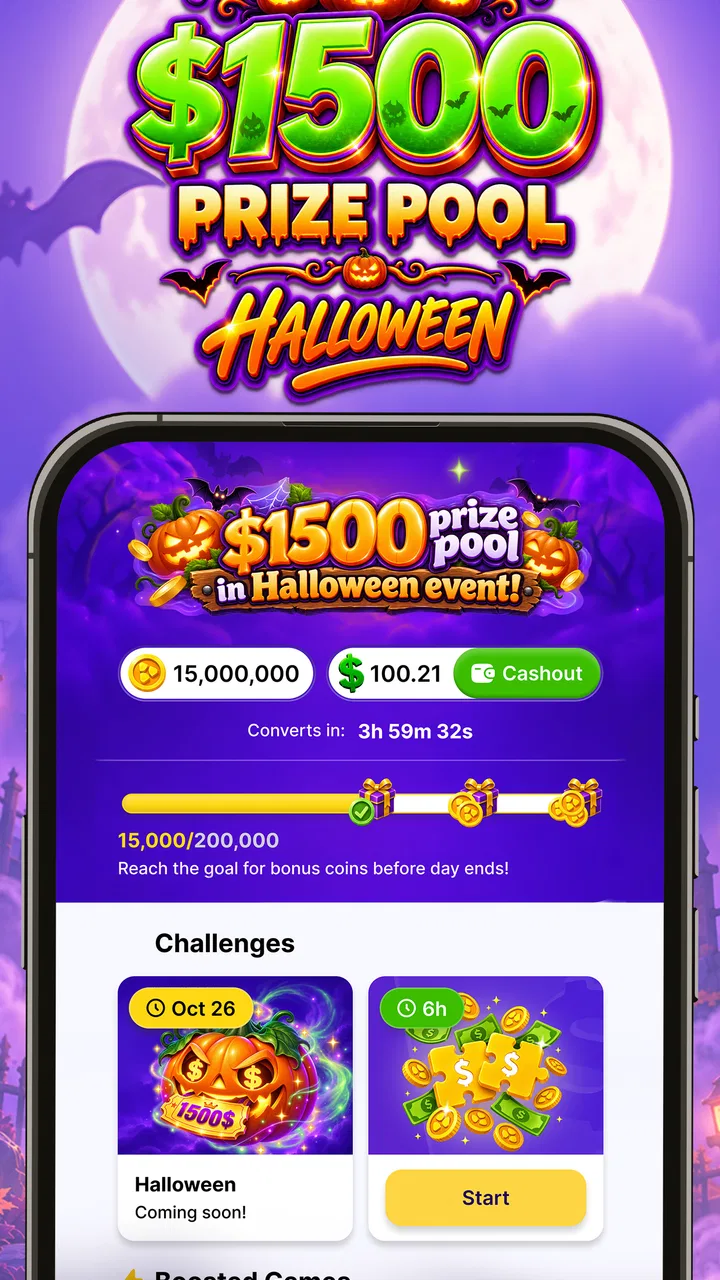
PuzzlePlay: Games & Rewards
- 4.7
- Rating
- 100.00K
- Installs
- Free
- Price

 Analysis by App-foxy
I tried PuzzlePlay: Games & Rewards as a casual entertainment app, and my first impression was straightforward: it is built around the appeal of playing puzzle games while working toward gift cards. That combination makes it more interesting than a basic time-killer, but it also means you need to approach it with realistic expectations. The puzzles are the main activity; the rewards are an extra reason to keep playing, not a replacement for a good game.
What I liked most is how easy it is to understand the basic idea. You open the app, choose a puzzle, play for a while, and watch your progress toward the reward system. I did not need a complicated setup to get started. If you enjoy short sessions on your phone, especially when waiting for an appointment or taking a break, the format makes sense.
At the same time, this is not the right choice for everyone. If you want a deep standalone puzzle game with a carefully developed story, sophisticated strategy, or a completely distraction-free interface, a traditional premium puzzle title may suit you better. PuzzlePlay is more appealing to people who like variety and the possibility of earning gift cards while they play.
You May Also Like

 Blood Strike: 2.5 Anniversary
Blood Strike’s Loadouts Turn Every Drop Into a Tactical Gamble
A close look at Blood Strike’s custom loadouts: how fast access to signature weapons reshapes its battle royale rhythm, rewards preparation, and narrows the gap between fights.

 Pandora - Music & Podcasts
Pandora’s Music Is Easy to Start, but Harder to Recover
Pandora’s strength is its low-effort path from a seed to a station. Its weak spot is how much confidence it asks you to place in connection, setup, and quiet recovery.

 8 Ball Pool
8 Ball Pool Is Built on Rivalries, Rematches, and Routine
A close look at the rivalries, rematches, shared routines, and unanswered safety questions that turn a quick pool match into a persistent mobile community.

 Samsung Music
Samsung Music’s Quiet Strength Is Playing What You Already Own
Its reach comes less from spectacle than from dependable access to a personal library. That simplicity is both the app’s strongest retention engine and its ceiling.

 AccuWeather: Weather Radar
AccuWeather Review: A Quick, Clear Forecast for Everyday Decisions
For everyday plans, the best forecast is the one you can understand quickly. AccuWeather makes rain timing, radar, and local conditions easy to act on, with a few trade-offs.

 Hill Climb Racing
Why Hill Climb Racing Still Turns Crashes Into One More Run
A tiny car, a bumpy hill and one more upgrade: Hill Climb Racing keeps resurfacing because its simple chaos makes every near-miss feel personal.
More From Our News Desk



How I used PuzzlePlay in a normal day
I use PuzzlePlay most sensibly by fitting it around a break rather than letting a reward goal dictate my day. In this section, I’ll focus on a small routine for choosing a session, checking progress without overdoing it, and deciding when it’s time to stop. That approach makes the app easier to enjoy whether I have a few spare minutes or a longer pause.
A simple routine works better than random tapping
My most useful approach was to treat the app as a small routine rather than something I opened without a plan. I would start with a short session, choose a puzzle that matched the amount of time I had, and stop before the experience felt repetitive. That made the reward element feel like a bonus instead of pressure to continue endlessly.
A realistic example is a commute or lunch break. I could open the app for a few minutes, complete a puzzle, and leave without needing to remember a complicated objective. Later, I could return and continue. This kind of use suits PuzzlePlay much better than expecting it to occupy an entire evening like a console game.
The app belongs to the entertainment category, and that is exactly how I think it should be treated. It is something to dip into when I want light mental activity. I would not use it as my primary puzzle platform, but it works as a convenient secondary option when I want a quick session with a possible reward attached.
What the reward angle changes
Gift cards can make ordinary puzzle sessions feel more purposeful, but they also change the way some people play. I found it helpful to focus on the quality of the session first and the reward progress second. Chasing progress too aggressively can make a relaxing game feel like a task.
Before spending a long period in the app, I would suggest checking how the current reward flow works inside the application and understanding what action is required to move forward. That habit matters because reward-based apps can be less satisfying when a user assumes that every minute automatically has the same value. The best experience comes from knowing the goal, then deciding whether the game itself is enjoyable enough to justify the time.
The app is free, which lowers the barrier to trying it. That is useful for curious users who do not want to pay upfront for a puzzle collection. Still, free entertainment often involves compromises, such as interruptions or a stronger focus on engagement than a paid game. I kept that trade-off in mind rather than judging it like a premium title.
Who is likely to enjoy it
I would recommend PuzzlePlay to casual players who like familiar puzzle formats, want something easy to pick up, and enjoy having a small incentive attached to their play. It can also suit people who prefer switching between different puzzle experiences instead of committing to one long campaign.
It is less suitable for children because its content rating is Mature 17+. Parents should pay attention to that rating rather than assuming that a puzzle-focused app is automatically appropriate for younger users. The age guidance is an important part of deciding whether it belongs on a particular device.
I would also hesitate to recommend it to anyone who dislikes reward systems on principle. If you find progress bars, redemption goals, or incentive-driven play distracting, the usual ad-free or paid puzzle alternative will probably feel cleaner and more satisfying.
Settings and habits worth checking first
My first practical tip is to look through the available settings before settling into a routine. I would check notification controls, sound, vibration, and any display or gameplay preferences that affect how comfortable the app feels during short sessions. Even small adjustments can make a difference when you use a puzzle app in public or during quiet moments.
Notifications deserve particular attention. If the app offers reminders, I would keep only the ones that are genuinely useful. A reward app can become annoying when it constantly pulls attention back to the phone. Turning down unnecessary prompts helps preserve the casual nature of the experience.
Sound is another easy adjustment. I preferred having a quieter setup when playing around other people, while a little audio feedback can make a solo session feel more responsive. The right choice depends on where you play, but checking it early prevents the app from feeling intrusive.
I also recommend reviewing the current version after installation and keeping an eye on updates through the normal app store process. PuzzlePlay is at version 1.30.0, and using the current release is the sensible way to avoid judging an older build. The minimum operating-system requirement is Android or iOS 10, so compatibility should be comfortable for many older supported devices, although the phone itself still needs enough free space and battery for regular use.
Small shortcuts that improve the experience
The fastest improvement does not come from rushing every puzzle. It comes from matching the puzzle to your available attention. When I had only a short break, I chose something I could finish cleanly. When I had more time, I was more willing to try a slower challenge. This avoids leaving half-finished tasks scattered across the session.
Another useful habit is to decide in advance how long you want to play. Reward-focused apps can encourage “just one more round,” even when the entertainment value has already dropped. A simple stopping point keeps the experience enjoyable and prevents the reward goal from taking over.
I also found it sensible to separate experimentation from repetition. At the beginning of a session, trying a different puzzle can help identify what feels most enjoyable. Once I knew which style suited my mood, repeating that choice made the session more efficient. This is especially helpful for users who are interested in rewards but do not want to waste time browsing.
There is a trade-off here. The most efficient path toward a reward may not always be the most enjoyable puzzle. If you optimize only for progress, you can turn entertainment into routine work. My preference was to use the reward system as a filter, not as the sole reason to remain in the app.
What experienced users should not assume
It is tempting to look for a secret combination of settings or a shortcut that transforms the app into a guaranteed earning tool. I did not treat it that way. The practical advantage comes from repeatable habits—choosing suitable sessions, controlling interruptions, and understanding the in-app reward steps—not from assuming that an undisclosed trick exists.
I would also avoid building a daily schedule around a fixed return. The app’s appeal is entertainment with a possible gift-card benefit, not a dependable income source. Anyone installing it should be comfortable with the game even if the reward progress feels slower than expected.
That distinction is important when comparing PuzzlePlay with ordinary puzzle apps. A conventional puzzle game may offer more polished progression, fewer incentive-related distractions, or a clearer premium structure. PuzzlePlay adds a reward motivation, but the user gives up some simplicity by having another system to consider.
Where the app reaches its limits
The main limitation is that the reward concept can raise expectations beyond what a casual puzzle app can realistically deliver. If you arrive mainly for gift cards, every slow step may feel frustrating. If you arrive for light puzzle entertainment and treat rewards as an extra, the same experience is easier to appreciate.
Another limitation is depth. Puzzle fans who want advanced difficulty curves, extensive customization, or a long-term competitive challenge may eventually outgrow the format. PuzzlePlay is better at quick engagement than at replacing a dedicated puzzle collection designed around mastery of one particular style.
The Mature 17+ rating is also a meaningful boundary. I would not install it on a child’s device simply because the central activity involves puzzles. Adults and older teenagers who meet the rating can make their own decision, but families should not overlook it.
There is also a personal-data and attention trade-off that I consider with any free reward app. I would read the app’s current permissions and privacy information before becoming a regular user, and I would avoid granting access that does not make sense for the experience. That is a general safety habit, but it is especially worthwhile when an app combines entertainment with rewards.
How it compares with familiar alternatives
Compared with a single-purpose puzzle game, PuzzlePlay feels broader in purpose. A normal puzzle title asks you to play because the puzzles themselves are compelling. Here, the reward layer gives you another reason to return. That can be motivating during short breaks, but it can also make the experience feel less pure.
Compared with a paid puzzle app, the free entry is the obvious advantage. You can test the format without committing money. The likely compromise is that the experience may be more focused on continued engagement and reward progress than a premium game would be.
Compared with a general rewards app that offers many unrelated tasks, PuzzlePlay has a clearer identity for people who specifically prefer games. You are not choosing between surveys, shopping actions, and miscellaneous offers; the central appeal is puzzle play. That focus is useful, although it means someone who wants the widest possible range of earning activities may prefer another category of app.
My advice is simple: choose PuzzlePlay when you want a casual puzzle habit and like the idea of working toward gift cards. Choose a dedicated puzzle game when challenge, polish, and uninterrupted play matter more than incentives.
Installation, audience, and everyday expectations
PuzzlePlay was released on November 7, 2025, by PuzzlePlay, and it has already attracted over one hundred thousand installs. Its average rating is 4.7 from around seven thousand ratings, with roughly three thousand written reviews. Those figures suggest that the concept is connecting with a sizeable group of users, though they should be read as a general signal rather than proof that every player will have the same experience.
I would install it on a device running a supported operating system, open the settings before playing seriously, and spend a few short sessions deciding whether the puzzles are enjoyable without relying on the reward promise. That test answers the most important question quickly: would I still want to play for a few minutes if progress toward a gift card were not my immediate focus?
If the answer is yes, the reward layer can make the app more appealing. If the answer is no, continuing only to chase the incentive is unlikely to feel worthwhile. This personal test is more useful than judging the app from its store summary alone.
My verdict after building a repeatable routine
PuzzlePlay works best as a casual puzzle companion, not as a serious earning platform. I enjoyed the low-friction format and the way a short break could become a small, goal-oriented session. The free price makes experimenting easy, and the reward idea gives the app a clear identity among entertainment options.
My recommendation comes with conditions. Keep notifications under control, choose puzzles according to the time you actually have, and check the reward process instead of assuming that progress will be automatic. Do not treat the app as guaranteed income, and do not overlook the Mature 17+ rating.
For adults who want light puzzle play with an added gift-card incentive, PuzzlePlay: Games & Rewards is worth trying. I would keep it alongside, rather than instead of, a favorite dedicated puzzle game. That combination gives you the best of both approaches: deeper play when you want a challenge, and a flexible reward-focused session when you only have a few spare minutes.
FAQs for PuzzlePlay: Games & Rewards
01What is PuzzlePlay: Games & Rewards?
PuzzlePlay: Games & Rewards is a mobile gaming app that brings together casual puzzle-style games and a rewards system. After installing it, users can browse the available challenges, play selected games, and collect points or other in-app rewards according to the platform’s rules. The exact game selection, earning opportunities, and reward conditions may change over time, so checking the current information inside the app is recommended.
02How do rewards work in PuzzlePlay: Games & Rewards?
Rewards are generally connected to gameplay activity, completed tasks, milestones, or other promotional objectives shown in the app. Before spending significant time, review the reward page carefully to understand how points are calculated, whether minimum thresholds apply, and which redemption options are available. Some offers may have specific eligibility requirements, expiration dates, or regional restrictions that users should consider.
03Is PuzzlePlay: Games & Rewards free to download and use?
The app may be available to download at no initial cost, but free access does not always mean that every part of the experience is completely free. PuzzlePlay may include advertising, optional purchases, sponsored offers, or features that depend on third-party games. We recommend checking the store listing and the app’s payment settings before playing, especially if the device is shared with children or other users.
04Can I really redeem the rewards I earn?
Redemption depends on the current terms, the user’s location, account status, and whether the required minimum balance has been reached. Users should not assume that every displayed reward is immediately available as cash or a gift card. Read the redemption instructions, identity or account-verification requirements, processing times, and any limitations before committing to an offer. Availability can also change without notice.
05What should I check before downloading PuzzlePlay: Games & Rewards?
Before downloading, review the app’s latest store rating, permissions, privacy policy, supported countries, age rating, and recent user feedback. It is also useful to confirm the developer name and whether the application is compatible with your Android or iOS version. Since reward apps often rely on advertisements and external offers, use a secure connection and avoid providing sensitive information unless the request is clearly explained and trustworthy.
Pros
- Wide variety of casual puzzle games in one app.
- Short sessions make it easy to play during spare moments.
- Simple controls are suitable for most players.
- Reward system adds extra motivation beyond completing levels.
- New challenges can help keep the experience from feeling repetitive.
Cons
- Rewards may require significant time or repeated gameplay to earn.
- Frequent ads can interrupt games and slow down progression.
- Some features may be limited behind in-app purchases.
- Game quality and difficulty can vary between included puzzles.
- An internet connection may be needed for rewards and account features.

PuzzlePlay: Games & Rewards
Gallery